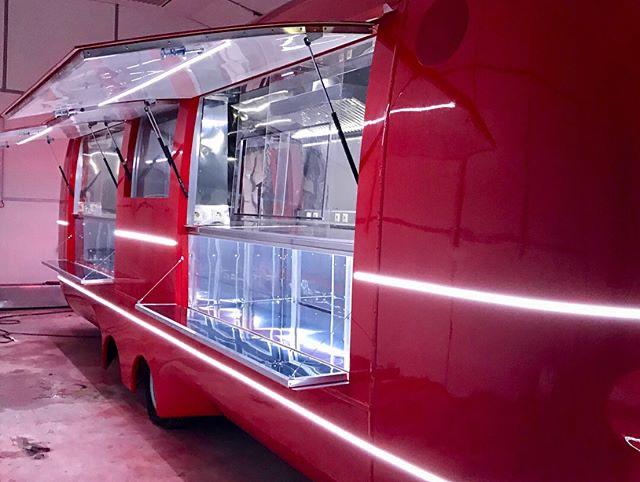
Plan the shopping visit from curb to receipt before choosing a trailer layout. Decide whether customers enter, shop from outside, attend by appointment or move between both sides of the unit. Then document merchandise, secure inventory, staff tasks, checkout, power, lighting, climate, site access, travel state and the exact builder handoff. A mobile store has to work when it is open, closed and moving.
This guide prepares a commercial brief. It does not promise a permit, sales result or universal retail configuration. The signed proposal, approved drawings, qualified professionals and authorities for the actual operating locations control the final project.
01Choose the kind of visit
"Mobile retail" covers several businesses that place different demands on the shell. Pick the primary visit before combining design elements.
| Customer mode | What the brief must explain |
|---|---|
| Walk-up counter | Queue direction, product view, staff reach, payment point and weather exposure |
| Customer entry | Approach route, entrance, circulation, occupancy, display reach and exit logic |
| Appointment showroom | Welcome point, consultation privacy, samples, seating and visit length |
| Product demonstration | Demonstration zone, utilities, audience position, storage and reset procedure |
| Touring pop-up | Venue changes, setup time, packed inventory, staffing and repeatability |
| Hybrid | Which mode has priority when space, openings or staffing conflict |
The customer path should fit into one sentence. For example: "See the collection from outside, enter through the rear, browse one loop, pay near the exit and collect a packaged order." That sentence gives the designer something testable. "Premium mobile boutique" does not.
02Make an inventory map before a merchandising plan
Display is only the visible fraction of the product load. Count what travels, what is displayed, what must remain locked and what staff need during a busy period. Include packaging, returns, cleaning supplies, devices, fixtures and personal belongings.
For each product family, record:
- The range of item dimensions and packed quantities, without treating an early estimate as the final load.
- Whether the item hangs, stacks, sits on a shelf, needs power, needs climate control or requires another handling condition.
- How staff replenish the display without blocking the customer route.
- What can remain in the unit during transport and how the responsible carrier or builder expects it to be restrained.
- How high-value stock, payment devices and records are secured after hours.
This map often changes the location of doors, cabinets and service access. It should reach the shell and final-build teams before they freeze openings.
03Draw open, closed and travel states
A good retail rendering usually shows the trailer at its most inviting. Procurement needs two more drawings.
The open state shows customer approach, awnings, doors, steps or other access elements, displays, queue, signs, lighting and staff positions. The closed state shows the secure exterior after trading ends. The travel state shows every exterior part secured and every interior item stored or restrained for movement.
Use a separate checklist for each state:
| State | Review points |
|---|---|
| Open | Customer route, staff visibility, product access, checkout, weather response and emergency procedures |
| Closed | Locks, glazing protection, alarm or camera scope, cash and device removal, exterior lighting and service access |
| Travel | Packed fixtures, inventory restraint, doors and openings secured, utilities disconnected and loose items cleared |
Do not assume a fixture designed for a store floor is suitable for a moving unit. The responsible builder and transport team need the actual product, fixture and travel information.
04Put merchandising and operations on the same drawing
Retail teams tend to discuss sightlines and product density. Builders need the staff route behind those decisions. Mark where a team member receives stock, opens cartons, replenishes, handles a return, charges a device and stores waste. Show the customer path on the same plan.
Now test the collisions:
- Can staff replenish a main display while a customer is browsing?
- Does an open door hide merchandise or signage?
- Does the payment line block entry, exit or a product demonstration?
- Can staff reach controls and storage without crossing a private or customer-only area?
- What happens to the display if the store shifts from staffed shopping to a walk-up event?
The answers belong in the approved plan and equipment schedule. They should not live only in a creative deck.
05Define lighting from the product outward
List the products and surfaces that need light, then identify the ambient, display, task, exterior and after-hours functions. Color-critical products may need a review method chosen by the retail team. Glare on glazing, screens and glossy packaging deserves a physical mock-up when it matters to the concept.
Lighting also belongs in the equipment and electrical schedule. Give the qualified designer the fixture models, controls, drivers, signs, screens, payment equipment, security devices and other loads. Record which items are supplied by the brand and which are installed by the builder. "Retail lighting included" is not a complete scope.
06Place checkout, data and device ownership
Map where the sale begins, where payment happens and where the receipt or product handoff occurs. Name the owner of each service account and device. If the business needs a primary connection and a backup, describe both in the operating brief without assuming coverage at every venue.
The team should also resolve:
- Hardware mounting, charging and cable access.
- Staff access to resets, replacements and daily closeout.
- Protection of devices in the closed and travel states.
- Responsibility for account activation, software, updates and support.
- The procedure when connectivity fails.
Payment processing, privacy and data-security requirements depend on the merchant, providers and chosen systems. The shell plan must leave room for the approved solution; the trailer manufacturer should not invent the merchant's compliance program.
07Review accessibility with the operating site
Customer access is a route, not a door width in isolation. Review how a person arrives from parking, sidewalk or venue circulation; how the route changes level; where the transaction or display occurs; and how the customer leaves. If service is offered from outside, include the approach and interaction point. If customers enter, include the entrance and interior route.
The DOJ's 2010 ADA Standards apply to covered temporary as well as permanent buildings and facilities. Whether a mobile retail configuration is covered, and which provisions apply, depends on its use, installation and legal context. State and local rules may add another layer. The owner and qualified design team should confirm the applicable standard with the authority having jurisdiction before the entrance and customer interface are approved.
DOJ's Title III regulatory guidance treats places of public accommodation in mobile units as covered by Title III's nondiscrimination obligations, while stating that the new-construction and alteration subpart is not applied to mobile units pending mobile-specific physical standards. Fixed site elements and state or local rules may still apply; obtain a project-specific determination.
08Give each site its own intake sheet
A touring store cannot rely on one generic site plan. Ask the venue or property contact for the placement area, approach route, surface, slope, clearances, power and other services, operating hours, loading window, security rules, weather plan, signage rules and required submissions.
Include the delivery vehicle and setup operation in that conversation. A position that looks generous on an event map may not provide the route or turning space needed to place the unit. The carrier and site team must approve their parts of the plan.
The final authority list will vary. Vehicle title and registration, zoning or placement, building and accessibility review, fire rules, event approvals, business licensing and sales-tax administration are not one permit. Assign a named owner for each applicable track.
09Match the shell platform to the visit
The MOBITRUCK mobile retail page frames the application around customer entry, merchandising, display lighting and inventory. The shell family follows the operating brief.
- MobiEdge is the architectural, glazed platform for customer-facing retail and service concepts where the connection between customer and interior is central.
- MobiAir offers a rounded, recognizable exterior for customer-facing commercial uses, including retail and brand activations.
- MobiCube provides a straight-wall envelope that can suit office, vending, service and other equipment-led plans.
These are platform directions, not a substitute for model selection. Compare them in How to choose a commercial trailer platform, then confirm the exact configuration in the proposal and approved drawings.
10Separate shell work from retail completion
Write the handoff point into the contract. Under the workflow reported by the owner, MOBITRUCK prepares the shell kit in Estonia; Concession Nation assembles the U.S. rolling shell and coordinates the VIN and vehicle-stage records assigned in the unit contract; Concession Nation or another qualified builder completes the retail interior under a defined scope. This workflow remains document-pending. The current unit label, VIN record and MCO or title package control the actual manufacturer and issuer identities.
Rolling shell is a commercial handoff term, not a federal vehicle-stage classification. The unit records must say whether the vehicle is complete or incomplete at handoff and whether a receiving builder has final-stage-manufacturer or alterer duties under 49 CFR Parts 567 and 568. The sales scope alone does not decide those duties.
The shell-versus-turnkey guide explains the delivery levels. For a retail project, the scope should also name responsibility for display fixtures, signs, glazing interfaces, lighting, electrical work, security devices, payment hardware, finish samples, inventory restraint, site equipment, drawings, inspections, testing, delivery and warranty.
When the buyer supplies fixtures or technology, record the required information and delivery date. A late device can affect power, mounting, access, cooling and closeout.
11Run a shopping rehearsal before acceptance
Load representative products and packaging. Put the expected staff in position. Have someone approach, enter if applicable, find an item, ask a question, pay, receive the product and leave. Then ask staff to replenish, process a return, secure the unit and prepare it for movement.
Record failures against the approved scope. A shelf that looks attractive but cannot hold the named product is not a branding problem. A locked cabinet that blocks daily replenishment is not a training problem. The rehearsal helps the team distinguish incomplete work from a change in the buyer's operating plan.
Closeout should include the documents promised for the contracted stage: unit records, installed-equipment information, manuals, test records, warranties, claim contacts, keys and a signed list of open items. The website cannot replace that file.
12Questions mobile retail buyers ask
Should customers enter the trailer or shop from outside?
Choose the mode that fits the product, visit length, staffing, sites, accessibility review, security and weather plan. A hybrid can work, but the brief should say which mode takes priority when the two compete for space or openings.
How much inventory can a mobile retail trailer carry?
That depends on the selected unit, completed weight, ratings, fixtures, equipment and transport plan. Count the intended stock and other loads, then have the responsible builder and transport professionals review them against the project-specific documents. Do not derive capacity from a photograph.
Can I use my existing retail fixtures?
Possibly. Give the builder the exact fixtures, attachment details, materials, dimensions, weights and travel plan before the layout is approved. Household or fixed-store furniture may need a different solution for a mobile installation.
Does MOBITRUCK sell a shell without the retail interior?
Yes. Shell-first and U.S. rolling-shell paths allow a qualified builder to complete the application. The proposal must identify the handoff condition, supplied documents, unfinished interfaces and separate warranty owners.
Who obtains event or local retail permits?
The contract should assign preparation and coordination, but the applicable authority issues its own decision. Each city, property and event may ask for different documents. Confirm the operating locations early enough to bring those requirements into the build.
What information is needed for pricing?
Provide the product range, customer mode, staff count, inventory, checkout and technology, operating locations, site services, move pattern, desired delivery level and target date. Pricing and timing should follow a reviewed scope, not a generic category label.
13Next step
Send the customer path, product list, inventory map, site information and delivery preference through Request a Quote. Add photos or sketches of any brand-supplied fixtures. MOBITRUCK can then discuss the shell platform and handoff while the final builder prices the named retail completion work.
Sources checked
Official planning references
- MOBITRUCK, Mobile retail trailers, MobiEdge platform, MobiAir platform, MobiCube platform and Manufacturing and U.S. completion path, checked 2026-09-18 for application, platform and project-stage descriptions.
- U.S. Department of Justice, 2010 ADA Standards for Accessible Design and Title III regulations, checked 2026-09-18 for temporary-facility, mobile-unit and nondiscrimination context. Coverage and the applicable physical provisions require project-specific review.
- National Highway Traffic Safety Administration, Importation and Certification FAQs, checked 2026-09-18 for manufacturer, VIN, certification-label and state title/registration boundaries.
- Electronic Code of Federal Regulations, 49 CFR Part 567, Certification and 49 CFR Part 568, Vehicles Manufactured in Two or More Stages, checked 2026-09-18 for manufacturer-stage and certification context.
 Project reference
 Next step